
Saved filters in Beenia help you quickly access the right tasks without manually adjusting filters every time. By setting up saved filters, you streamline your workflow and ensure that important activities are always within reach.
Creating a Saved Filter
To create a saved filter, apply your desired filters (such as due date, assignee, status, or tags) and click Save View. Give it a name that clearly represents its purpose, such as "Urgent Tasks" or "Weekly Priorities."
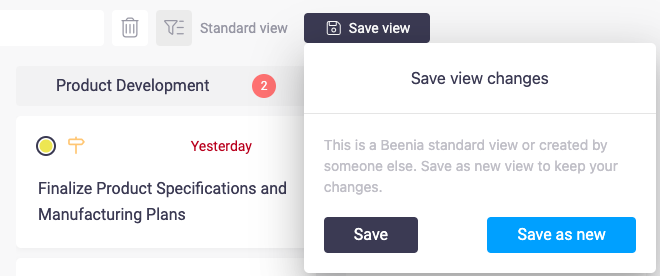
Using and Switching Between Filters
Once saved, your filters appear in the Saved Views menu, allowing you to switch between different task lists instantly. This helps when you need to track multiple projects, manage different workflows, or focus on specific deadlines.
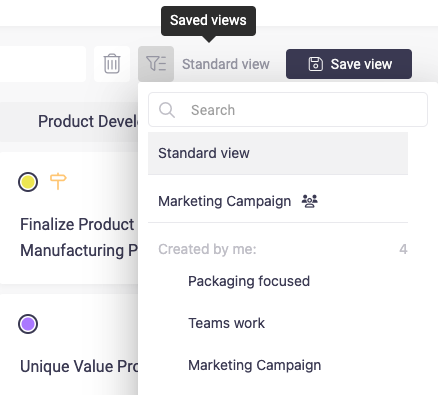
Sharing Saved Filters with Your Team
For teams, shared saved filters ensure everyone follows the same workflow structure. If your department works on approvals, you can create a "Pending Approval" filter and share it with the team for consistent tracking.
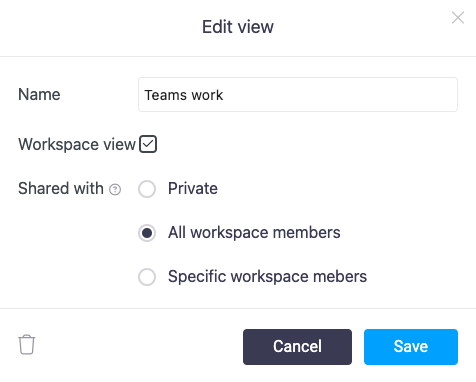
Editing or Removing Saved Filters
You can always update saved filters by adjusting the applied criteria and resaving them. If a filter is no longer relevant, simply delete it to keep your workspace organized.
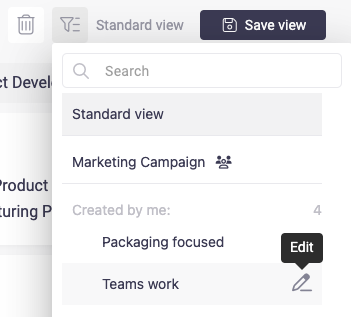
Saved filters make task management faster, clearer, and more efficient. Start using them today to focus on what matters most with just one click!