
Tracking time on activities in Beenia allows you to understand where your efforts go, improve project planning, and ensure better time allocation. Whether you want to monitor billable hours, optimize workflows, or simply stay organized, Beenia makes time tracking effortless.
How to Track Time on an Activity
When you open an activity, you’ll see a time tracking section at the top, displaying the total tracked time for that specific task. You can track time in two ways:
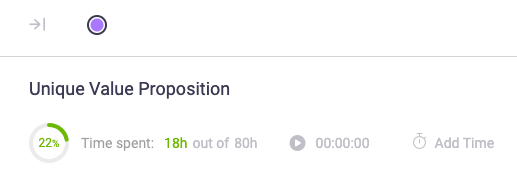
1.Automatic Time Tracking
- Click the Play button when you start working on an activity. The timer will begin tracking your time automatically.
- While tracking, the Play button changes into two options:
- Pause – If you need to take a break, pausing stops the timer temporarily.
- End – Click this when you finish working on the task to save the tracked time.

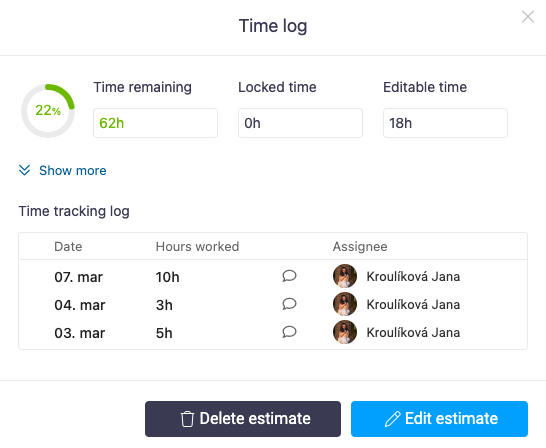
Every tracked session is recorded and adds up, giving you an overview of the total time spent.
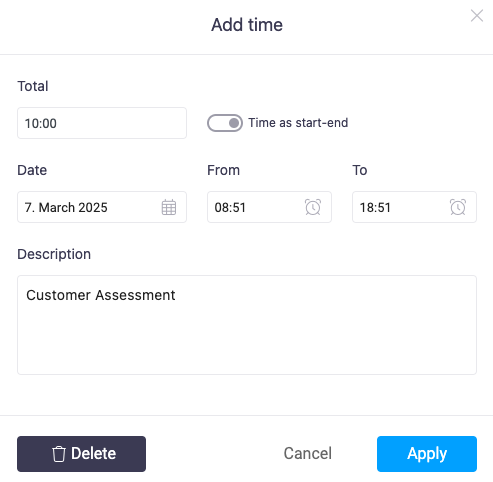
2.Manual Time Entry
- Click Add Time to manually log hours worked.
- Enter the total time, select the date, and optionally add a description.
- If you need more detail, enable Start & End Time to specify the exact time range.
Setting Time Estimates
To plan your workload effectively, use the Estimate button to define the expected time needed for an activity. For example, setting a 20-hour estimate will show a circular progress chart, updating in real-time as you track time. This helps teams stay on budget and manage capacity efficiently.
Why Use Time Tracking?
For employees, it provides clear insights into time management, reduces last-minute stress, and allows for better scheduling. For managers, it helps allocate resources, identify bottlenecks, and improve efficiency across projects. With real-time progress tracking, teams can stay on top of deadlines without unnecessary micromanagement.
Encouraging time tracking as a self-improvement tool rather than a control mechanism fosters transparency and productivity. Use Beenia’s seamless time tracking to streamline workflows, ensure accountability, and make the most of your team’s valuable time.