
Embedding Beenia objects into other platforms lets you display activities, boards, or workspaces in external apps or websites—just like you would embed a YouTube video. This makes it easier to share work progress, collaborate externally, or display interactive content in client dashboards, intranets, or project portals.
🔧 How to Embed Beenia Content:

- Open Workspace Settings
Click the gear icon in the top-right corner of your workspace. - Go to Privacy and Sharing Tab
Navigate to the Privacy and Sharing section. - Enable Public Access
Switch "Public access via URL" to ON. This allows objects in your workspace to be publicly shareable. - Copy the Embed Code
You will now see an "Embed to page" section with an iframe code:
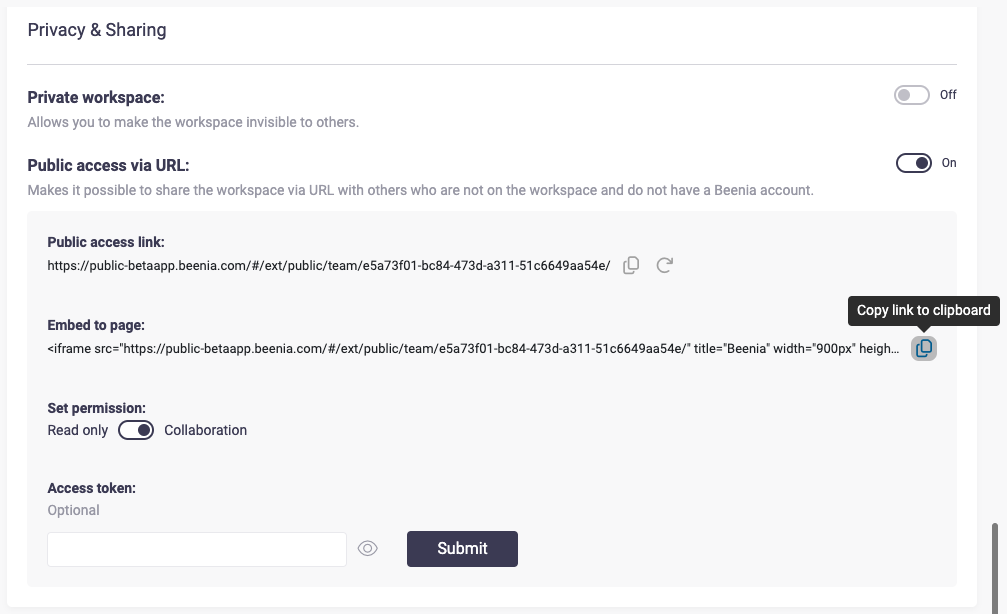
Paste the Code in Another App
Insert the code into your website, documentation page, client portal, or wherever you need to display the Beenia view.
💡 Why Use Embedding?
- For Clients: Share a live view of project progress without needing them to sign up.
- For Teams: Display Beenia boards directly on your team intranet or Notion pages.
- For Reports: Add interactive boards or task views into internal documentation or dashboards.
- For Freelancers & Contractors: Provide access to relevant activities without full account invitations.
✅ Key Benefits
- No need to switch between apps
- Keeps stakeholders in the loop
- Enables real-time visibility and transparency
- Simple setup—no coding skills required
Try embedding your Beenia boards today and make your work visible, connected, and collaborative across platforms.