
Managing user roles in Beenia is straightforward and can be done through the main Administration. Only admins have the ability to modify user roles.
How to Change a User's Role:
- Go to Administration: Navigate to the Administration section of your Beenia account.
- Open the "People" Tab: This tab lists all users in your workspace.
- Select a User: Click on the user whose role you want to change.
- Edit Account Type: Under the Permissions section, select a new role from the Account type dropdown. The available roles are:
- Guest
- Member
- PRO
- Admin
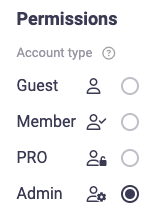
The new role will be applied immediately.
Besides changing the user role, you can also update additional details such as name, position, company, and contact information.
By effectively managing roles, you can control access levels and ensure smooth collaboration within your team.