
Assigning a team space leader in Beenia is a quick and straightforward process. Follow these steps to designate a workspace leader:
- Open the Workspace – Navigate to the specific workspace where you want to assign leadership.
- Go to the Members Tab – In the workspace menu, select the Members tab to view a list of all team members.
- Select the User – Find the person you want to assign as a leader and click on their profile to open their details.
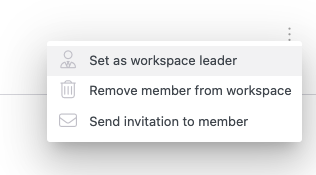
- Access the Options Menu – In the top-right corner of their details panel, click on the three-dot menu to open a dropdown list.
- Assign Leadership – Click Set as Workspace Leader to grant leadership status to the selected user.
Once assigned, the new team leader will have a badge icon next to their name, indicating their leadership role in the workspace.

This role allows them to oversee the workspace, manage members, and facilitate collaboration efficiently.